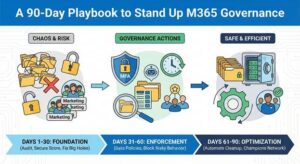
A 90‑Day Playbook to Stand Up M365 Governance
Authored by: Kishore Bitra
We have all experienced this. You set up Microsoft Teams and SharePoint to enhance collaboration in your company. Initially, everything seemed perfect. Everyone is chatting, sharing files, and being productive. However, six months down the line, you check the backend, and its chaos. There are countless inactive teams, files shared with the wrong people, and five different groups called ‘Marketing.’
Throughout my years as an M365 expert, I’ve noticed that taking a ‘set-it-and-forget-it’ approach with Microsoft 365 results in three main issues they are security vulnerabilities, confusion, and unnecessary waste. If you don’t actively manage the system, it will eventually retire or be replaced with another system.
Here is a practical approach to fix this, based on a proven 90-day rollout strategy.
-
Lock the Front Door & Strengthen the identity:
The days of relying on a corporate perimeter firewall to keep bad actors out are over. Today, your user identity and their intelligence are the only wall that matters. The single most important action you can implement is to enable phishing-resistant Multi-factor Authentication. (MFA).
I reviewed an organization setup where I found multiple accounts with Global admin access and applications with “Read & Write” access to ALL SITES. That’s a big red flag. Before I put any new policies into action, I made it a top priority to address the problem of excessive permissions.
2. Before AI, clean Up Your Data & organize it:
We are already in the age of AI, and tools like ChatGPT and Copilot are widely used by all users in their personal and professional lives. The scary truth is, Copilot is very good at finding data. If your data in SharePoint or Teams is too open for everyone in the organization or doesn’t have a proper hierarchy permissions structure, then Copilot might accidentally show sensitive payroll data or PII, HIPAA documents to an intern who asks a simple question.
3. Lifecycle Management – Accounts & resources:
When you leave the organization to the users, they create too many teams or sites and then abandon them. This makes it difficult to locate the current work, and it will incur costs to procure additional storage. You need to automate the cleanup. You can set up “expiration policies” that ask group owners to renew their teams every 180 days. If they don’t renew, the team is archived or deleted.
4. Identify the champions:
You can build the perfect technical system, but if your users hate it, they will find ways around it. This is called ‘Shadow IT’, like using personal Dropbox accounts because the company’s SharePoint is too hard to use. To fix this, do not just send an email explaining a new rule. Build a “Champions Network.” Find the people in your company who love technology and train them first. Let them help their peers. Peer support is often more effective than an IT ticket.
The 90-Day Plan
If you try to fix everything at once, you will fail. Instead, break it down:
Foundation (Days 1-30): Audit the system, find the gaps, and document them. Check your secure Score to see where you stand. You don’t need to invest in fancy tools; you can depend on the default MS Secure score and identity score available in M365. Fix the big holes, like enabling MFA for admins, deactivating unused accounts, and restricting users from inviting unauthorized external users.
Enforcement (Days 31–60): Turn on the policies, such as data labeling and data protection policies. The DLP policies can be enforced to encrypt the emails sent outside the organization if they have sensitive content. Also, block risky behaviors, like risky users and risky sign-ins. Implement geo-fencing to prevent users from accessing the resources outside the country if they don’t need to.
Optimization (Days 61-90): Automate the cleanup activities like deactivating unused accounts, archiving the inactive TEAMS, Sites, Data, etc., and identifying the champions to help users adapt to the new policies.
Governance isn’t about stopping people from working. It is about building a safe, clean space where work can happen. Start small, automate what you can, and keep it simple.
Authored by: Kishore Bitra, Lead – Collaboration Engineering
kbitra.substack.com| linkedin.com/in/bitra